Desktop & phone widgets
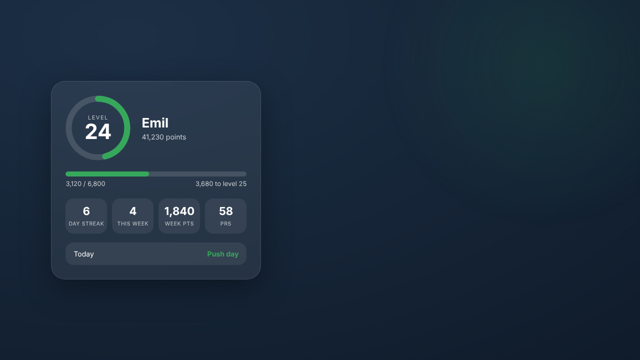
Put your level, points, streak and today's workout on your desktop or phone. The same widgets work for your MyFitLevel and your SnakeDiet numbers: just paste the API key from the site you want (the widget detects which one it is). They only use your personal key, so nothing is shared with anyone else.
Before you start: get your key
- Log in, open Settings → API access and press Generate API key. Copy it, it is shown once. (For SnakeDiet numbers use the key from snakediet.org, it starts with
sd_.) - The widgets read your stats through
https://mail.myfitlevel.com/api/v1/widget?key=YOUR_KEY. They can only read your numbers. - Treat the key like a password. If it leaks, generate a new one in Settings and the old one stops working.
Which should you pick? On Windows 10/11, Lively Wallpaper is the easiest (a full animated wallpaper, no coding). Rainmeter gives a small widget that sits on top of your normal wallpaper. On iPhone use Scriptable. These were made by the community and are not tested on every setup, so tell us what breaks via feedback.
Windows: Lively Wallpaper (recommended)
Free from the Microsoft Store (search "Lively Wallpaper").
- Download the wallpaper (zip).
- In Lively, drag the zip onto the window (or press + → Add wallpaper → choose the zip).
- Click the wallpaper to set it, then the Customise (sliders) icon and paste your API key into API key. Pick colours, size and left/centre/right position there too.
Want to change the design? The wallpaper is a single index.html file; open it in any text editor.
Windows: Rainmeter
Free from rainmeter.net.
- Download the skins (zip) and unzip it into
Documents\Rainmeter\Skins\. You get two skins:MyFitLevelandSnakeDiet(use one or both). - Open
@Resources\Variables.incinside the skin folder in Notepad and put your key on theApiKey=line. - In Rainmeter's manager click Refresh all, find MyFitLevel or SnakeDiet, and Load the skin. Click the widget to open the site.
macOS: Übersicht
- Install the free Übersicht.
- Download the widget (zip), unzip it, and move
myfitlevel.widgetto~/Library/Application Support/Übersicht/widgets/. - Open
index.jsxin a text editor, paste your key into theKEYline and save. The widget appears on your desktop.
iPhone & iPad: Scriptable
- Install the free Scriptable app from the App Store.
- Open the script, copy everything, and paste it into a new script in Scriptable (name it MyFitLevel).
- Add a Scriptable widget to your home screen, long-press it → Edit widget → Script: MyFitLevel, and paste your API key into the Parameter field.
Android
There is no ready-made Android widget yet. Two options today: (1) add MyFitLevel to your home screen from the browser menu (it installs as an app), or (2) in the free-to-try KWGT widget app use its web function to read the numbers, for example $wg("https://mail.myfitlevel.com/api/v1/widget?key=YOUR_KEY", json, "$.level")$ for your level (the other fields are xp, streak, week_workouts, today_label; for SnakeDiet use https://snakediet.org and also fast_hours). This is a starting point we have not tested in KWGT, so tell us how it goes.
Linux: Conky
Download the MyFitLevel Conky config (or the SnakeDiet one), replace PASTE_YOUR_API_KEY_HERE with your key (it appears in each line), install curl, jq and conky, and run conky -c myfitlevel-conky.conf.